
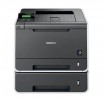
Laserski barvni

Barvni laserski tiskalnik BROTHER HL-4570CDWT

Spletna cena z DDV

  € 598,69
oz. že od € 17,54/mesec* (36 mesecev/5,50% obrestna mera)
INFORMATIVNI IZRAČUN PLAČIL NA OBROKE
Zapri

INFORMATIVNI IZRAČUN PLAČILA NA OBROKE Z PLAČILNO KARTICO DINERS


Zaloga: Preverite na info@sestavi.si ali preko obrazca za spletno pomoč

Ni več v ponudbi

Koda izdelka:


Opis izdelka

Šifra izdelka: HL4570CDWT


Printer
Print TechnologyColor Laser Technology
Consumable Tipe4 Toner Cartridges & Drum
Max. Black Print Speed (ppm)30ppm Black
Max. Color Print Speed (ppm)30ppm Color
Print Resolution (maximum dpi)Up to 2400 x 600 dpi
Duplex Printing StandardYes
Standard Paper Capacity (sheets)‡800-Sheet Input Capacity
Multi-purpose Tray Capacity‡50-Sheet Multi-purpose Tray
Standard Interface(s)Wireless 802.11b/g, 10/100 Base-TX Ethernet and Hi-Speed USB 2.0
USB Direct Interface / PictBridge‡Yes/No
Printer Driver Compatibility†Windows® & Mac OS®
Mobile device printing app‡Brother™ iPrint&Scan free app download for wireless printing (JPEG & PDF) from your Apple®, Android™ or Windows® Phone 7 (JPEG only and scanning not available) mobile device
Emulation(s)PCL6, BR-Script3‡
Secure PrintingYes
Max. Monthly Duty Cycle‡60,000 pages
Recommended Monthly Print Volume‡750 to 4,000 pages
First Time to PrintLess than 16 sec (color and black)
Standard Memory (MB)128MB Memory
Optional Memory (MB)Up to 256 MB (DDR2 16bit, 144pin)‡
Network-ReadyYes


Supported Network Protocols (IPv4)ARP, RARP, BOOTP, DHCP, APIPA(Auto IP), WINS/NetBIOS name resolution, DNS Resolver, mDNS, LLMNR responder, LPR/LPD, Custom Raw Port/Port9100, IPP/IPPS, FTP Server, TELNET Server, HTTP/HTTPS server, TFTP client and server, SMTP Client, SNMPv1/v2c/ v3, ICMP, LLTD responder, Web Services (Print), CIFS client, SNTP client, APOP, POP before SMTP, SMTP-AUTH, SSL/TLS (IPPS, HTTPS, SMTP, POP), SNMP v3, Kerberos
Supported Network Protocols (IPv6)NDP, RA, DNS resolver, mDNS, LLMNR responder, LPR/LPD, Custom Raw Port/Port9100, IPP/IPPS, FTP Server, TELNET Server, HTTP/HTTPS server, TFTP client and server, SMTP Client, SNMPv1/v2c/v3, ICMPv6, LLTD responder, Web Services (Print), CIFS Client, SNTP Client
Wireless Network SecurityWEP 64/128 bit, WPA-PSK (TKIP/AES), WPA2-PSK (AES), 802.1x (LEAP, EAP-FAST, PEAP, EAP-TLS, EAP-TTLS)
Wi-Fi CERTIFIED™Yes
One-Push Wireless ConfigurationAOSS™, Wi-Fi Protected Setup™ capable routers
Security FunctionsSecure print, Secure function lock
Recommended Paper BrandsPlain Paper: Xerox 4200 20 lb., Hammermill Laser Paper 24 lb., Labels: Avery Laser Label #5160, Glossy Paper 65 lb.
LCD DisplayYes (Flip-up)
LCD Back-litYes
CPU (Processor) TipeStarSaphire SS1000
CPU (Processor) Speed400 MHz
Resident Fonts66 scalable fonts, 12 bitmap fonts, 13 bar codes (PCL); 66 scalable fonts (BR-Script3)
Toner Save ModeYes
Media TipePlain Paper, Thin Paper, Thick Paper, Thicker Paper, Recycled Paper, Bond, Label, Envelope, Env. Thin, Env.Thick, Glossy Paper‡
Paper Handling Size - Paper TrayLetter, Legal, Executive, Folio, A4, A5, B6
Paper Handling Size - Multi-purpose TrayWidth 2.75" to 8.5", Length 4.57" to 16"
Sheet Weight - Paper Tray16-28 lbs. (bond)
Sheet Weight - Multi-purpose Tray16-43 lbs. (bond)
Output Paper Capacity (sheets)150 sheets (face down)
Power Source110V-120V AC 50/60 Hz
ENERGY STAR® QualifiedYes
Power Consumption - Sleep/Ready/Printing0.7W/70W/560W
Operating Env: Temperature50-90.5 degrees F
Operating Env: Humidity20-80% (w/out condensation)
Machine Noise (Ready/Printing)33dB/57dB
Unit Dimensions (W"xD"xH")16.1" x 19.5" x 17.6"
Carton Dimensions (W"xD"xH")32.1" x 23.6" x 33.5"
Unit Weight (lbs)59.5 lbs.
Carton Weight (lbs)86.0 lbs.
UPC Code0 12502 62533 9
"In-Box" Consumables (Yield)‡(1) TN310BK Standard Yield Black Toner Cartridge (2,500 pages)
(1) TN310C/TN310M/TN310Y (1,500 pgs each)
(1) DR310CL Drum Unit (25,000 pgs)
Carton Contents(1) TN310BK Standard Yield Black Toner Cartridge (2,500 pages‡)
(1) TN310C/TN310M/TN310Y (1,500 pgs‡ each)
(1) DR310CL Drum Unit (25,000 pgs‡)
CD-ROM – Includes User's Manual and Printer Drivers
AC Power Cord
Quick Setup Guide